📣 How to: Print Your Gradebooks!
As the academic year comes to an end, please print your gradebooks for your records. All courses will be reset shortly after the term ends.
🧭 Steps to Print Your Gradebook (User Report):
1️⃣ Navigate to your course
2️⃣ Go to the Gradebook, then select 'User report'
🖨️ To Print (or Save as PDF):
-
🖱️ Highlight the section you want to print (avoid selecting headers/footers)
-
📄 Press
CTRL + Por select Print -
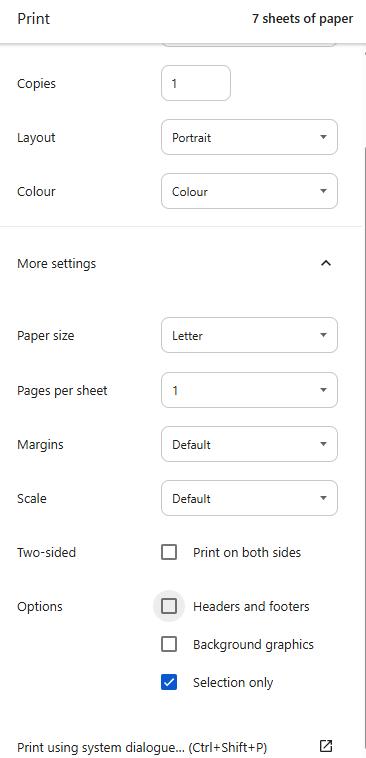
⚙️ In "More settings":
☐ Uncheck Headers and Footers
✅ Select "Print Selection Only" -
✔️ Click Print!
🗂️ Keep a digital or printed copy for your personal records.